Your Playlists
You can create playlists featuring Insure TV content. These can be to create a playlist of videos you want to watch.
From the Dashboard or the menu in the top right of the webpage select Playlists to go to your Playlists management page. Here your playlists will be listed, with an edit option and summary of viewing time completed.
Creating a playlist
On your list of playlists you can select Create New Playlist at the top. If you have not set up any custom playlists you will only see this option.

Complete the fields to create your playlist:
- Name - the name of your playlist.
- Description - a description for your playlist.
- Playlist Videos - select 'Add video' and start typing the name of any content you know you wish to add.
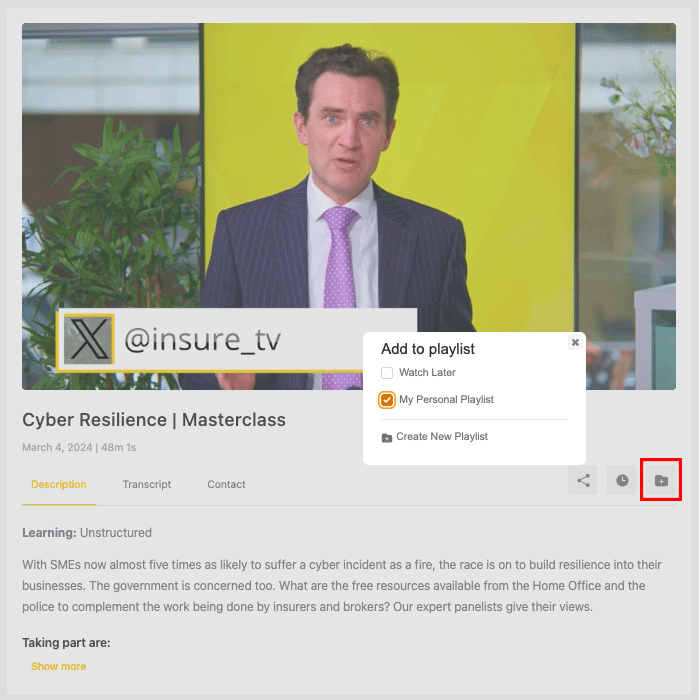
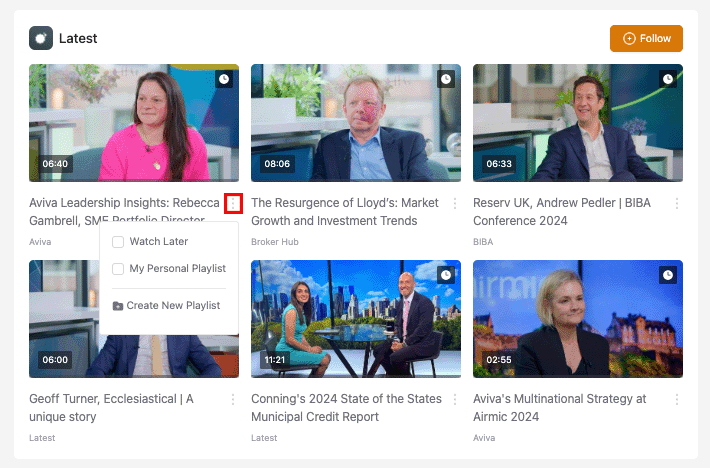
To add additional content to your playlist you can return and edit the playlist. It is also possible to add by clicking on the menu button represented by three dots on video library page (check the box next to the playlist you wish to add the video to);
or using the folder icon under the video player.